Pixart AI Photo Editor0.2.0
Publisher Description


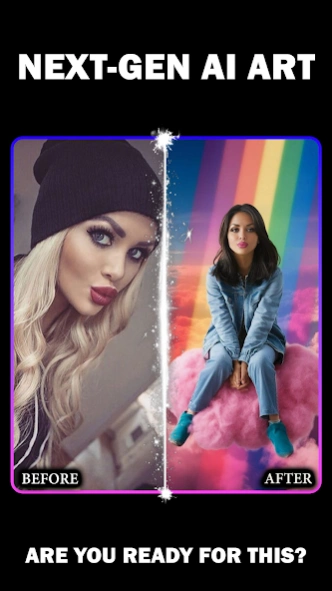

AI photo editor: Create cartoons, avatars & art. 400+ filters. Fast & easy!
Transform your photos into stunning masterpieces with Pixart - the ultimate AI photo editor for creating cartoons, avatars, and artistic effects! Whether you want an AI photo editor for Instagram, TikTok profile pictures, or professional AI headshots, Pixart is your go-to free photo editor app with powerful AI art capabilities.
Pixart is more than just a photo editor - it's your personal AI art generator and cartoon maker. Turn ordinary selfies into extraordinary AI avatars, transform landscapes into beautiful paintings, or create eye-catching cartoon versions of your photos in seconds. Perfect for social media creators, digital artists, and anyone who loves creative photo editing.
✨
AI Photo Editor Features
✨
🎨
AI Art Generator & Cartoon Filters:
- 100+ artistic styles: cartoon filter, anime, sketch, watercolor, oil painting, pixel art
- AI cartoon photo editor that transforms photos into cartoons instantly
- Professional photo filters for Instagram-worthy results
- AI art effects: vintage, aesthetic, cyberpunk, renaissance styles
- One-tap AI photo enhancement for perfect pictures
👤
AI Avatar Maker & Profile Creator:
- Create unique AI avatars for social media profiles
- AI profile picture generator for Instagram, TikTok, Discord, WhatsApp
- Transform selfies into cartoon characters and anime avatars
- Perfect cartoon yourself app for fun transformations
🖼️
Advanced Editing Tools:
- Photo enhancer with AI for crystal-clear HD quality
- Portrait editor for professional AI headshots
🎭
Creative Effects & Filters:
- Cartoon filter for Instagram and TikTok content
- AI art photo effects for unique creations
- Face filter and beauty effects powered by AI
- Vintage, retro, and aesthetic filters
- AI-powered color enhancement
💎
Premium Features:
- High-resolution export up to 4K quality
- Fast AI processing - results in under 5 seconds
🚀
Why Choose Pixart?
✓ Best Free AI Photo Editor: Powerful features at no cost
✓ Fast AI Art Generator: Incredible results in seconds
✓ Easy Cartoon Filter: No complex tools needed
✓ Professional Avatar Maker: Create standout AI avatars
✓ Regular Updates: New AI styles and filters added weekly
✓ Secure & Private: Your photos stay on your device
📱
Perfect For:
Instagram & TikTok:
- AI photo editor for Instagram posts and stories
- Create viral TikTok content with cartoon filters
- Design attention-grabbing profile pictures
Professional Use:
- AI professional headshot for LinkedIn profiles
- Business headshots without hiring photographers
- AI headshot generator for resumes and CVs
Creative Projects:
- Turn photos into cartoon art for gifts
- Create AI art for home decoration
- Design custom greeting cards
🆕
Latest Updates
- NEW: AI Professional Headshot Generator
- Enhanced cartoon filter with better detail
- Faster AI processing - 3x speed improvement
- Expanded AI avatar styles
📲
Download Pixart Now!
Join millions of creators transforming photos into extraordinary AI art, cartoons, and avatars. Download Pixart - your complete AI photo editor, cartoon filter app, and avatar maker - completely FREE!
Perfect for: AI photo editing, cartoon filters, avatar creation, AI art generation, professional headshots, Instagram content, TikTok videos, social media profiles, and creative photo effects.
Pixart is the perfect AI photo editor for artists, creators, and anyone looking to add a touch of magic to their photos. Download now and start creating!
About Pixart AI Photo Editor
The company that develops Pixart AI Photo Editor is RS AI Apps. The latest version released by its developer is 0.2.0. This app was rated by 2 users of our site and has an average rating of 4.8.
To install Pixart AI Photo Editor on your Android device, just click the green Continue To App button above to start the installation process. The app is listed on our website since 2026-06-25 and was downloaded 30 times. We have already checked if the download link is safe, however for your own protection we recommend that you scan the downloaded app with your antivirus. Your antivirus may detect the Pixart AI Photo Editor as malware as malware if the download link to com.zrtech.pixart is broken.
How to install Pixart AI Photo Editor on your Android device:
- Click on the Continue To App button on our website. This will redirect you to Google Play.
- Once the Pixart AI Photo Editor is shown in the Google Play listing of your Android device, you can start its download and installation. Tap on the Install button located below the search bar and to the right of the app icon.
- A pop-up window with the permissions required by Pixart AI Photo Editor will be shown. Click on Accept to continue the process.
- Pixart AI Photo Editor will be downloaded onto your device, displaying a progress. Once the download completes, the installation will start and you'll get a notification after the installation is finished.
Program Details
System requirements
Download information
Pricing
Version History
version 0.2.0
posted on 2026-06-25
BIG UPDATE! We listened to your feedback.
🚀 Faster & Smoother: Enjoy quicker avatar creation.
🐞 Major Bug Fixes: A more stable, crash-free experience.
🎨 New Styles Added: Discover fresh looks for your AI avatars!
Enjoying the new & improved Pixart? A positive review helps our small team grow. Thanks for your support!
version 6.0.0.17
posted on 2024-12-16
Hey there! What a TOONtastic day for an update on Pixart! We're thrilled to bring you fresh AI avatars arrivals along with a few behind-the-scenes bug fixes. Get ready for some fun! ;)
version 4.0.0
posted on 2023-10-28
Minor bug fixes and improvements.
